
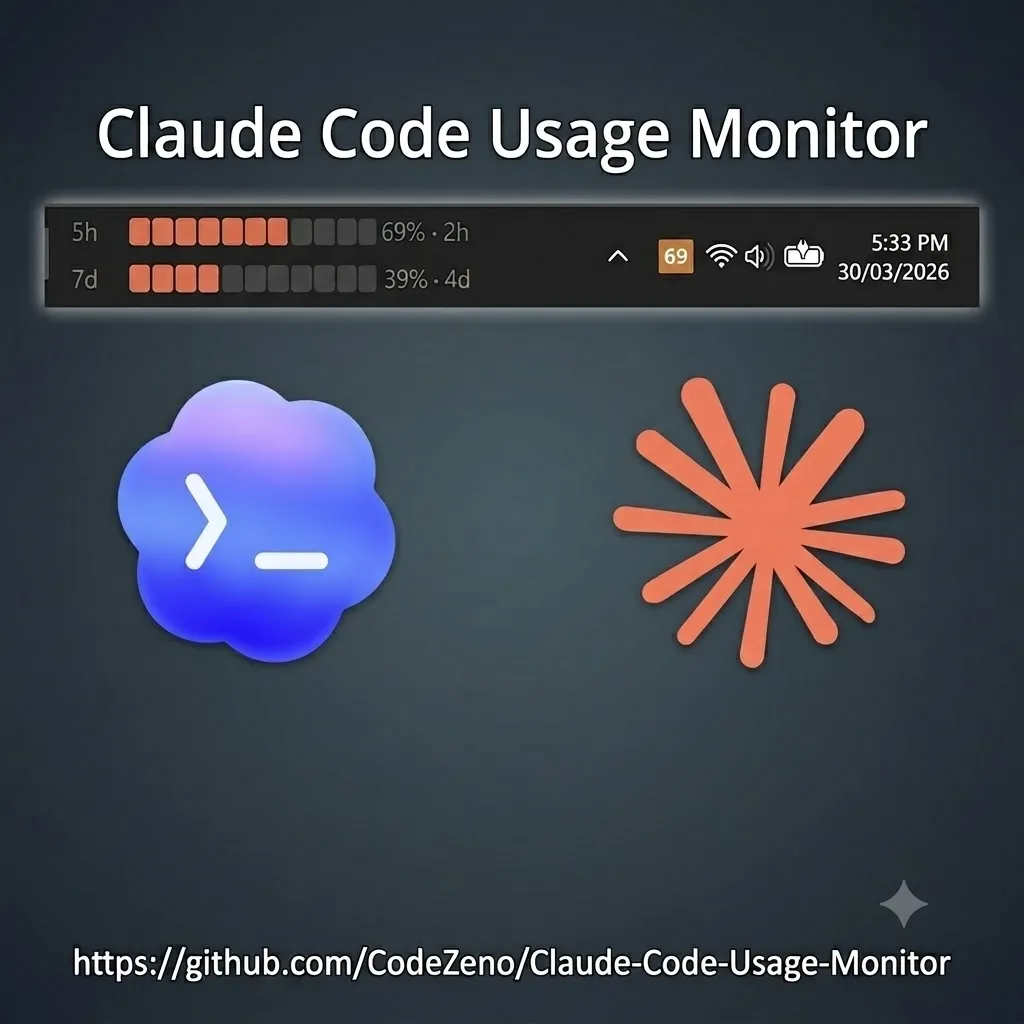
If you use Claude Code every day, you know the scene: you're deep into a task, thinking is flowing, and out of nowhere the usage limit warning shows up. Claude works with two rolling windows, one of 5 hours and one of 7 days, and it's easy to lose track of how much is left in each. The interruption almost always lands at the wrong moment, right when you were getting somewhere with something complicated.
The other day I ran into a small project that solves exactly this: the Claude Code Usage Monitor by CodeZeno. A small widget that sits in the Windows taskbar and shows your usage for both windows in real time, without opening the terminal or the Anthropic website.
What Claude Code Usage Monitor tracks
The idea is straightforward: you see the status of both windows at a glance, without going anywhere to check.
- Both windows at once, the 5-hour and the 7-day, with live countdowns.
- A system tray icon with your usage percentage, so a quick look tells you where you stand.
- A widget that lives in the taskbar and can be dragged wherever you want it.
- A right-click menu to adjust refresh rate, switch language, set it to start with Windows, and check for updates.
- Optional Codex tracking alongside Claude, if you use both (Codex has its own analytics page, but the widget consolidates everything in one place).
When the primary reading isn't available, it falls back to the rate-limit headers from Claude's own Messages API. In practice, you're rarely left without a number.
Why Claude Code usage limits catch you off guard
Claude Pro and Max have rolling usage windows, not a simple counter that resets at midnight. The 5-hour window starts from your first message in a given period, and the 7-day window works the same way. The problem is that the only official way to check is opening Anthropic's usage page, which means leaving your workflow every time. Without that, you either have to remember when you started, or find out the hard way when the warning appears.
For anyone using Claude Code for long programming tasks, it's especially annoying. You start a big refactor, or ask Claude to analyze an entire codebase, and when you're close to the finish line, it cuts out. Knowing what's left before you start changes how you plan the work.
How to install Claude Code Usage Monitor on Windows
- Open a terminal (PowerShell or Command Prompt).
- Run this command:
winget install CodeZeno.ClaudeCodeUsageMonitor
- Wait for the installation to finish and run the program.
- An icon will appear in the system tray, near the clock.
- Left-click the icon to show or hide the widget.
- Right-click to open settings.
If you'd rather skip WinGet, you can download the executable directly from the project's releases page. Download, run, done.
The only requirement is having Claude Code already installed and authenticated on your machine, either the CLI or the desktop app. To track Codex usage too, you'll need the Codex CLI as well.
Why running fully local matters
Two things convinced me. First, privacy: it runs completely local, no backend, no telemetry, nothing leaves your computer. It reads the credentials from the CLIs you already have installed, including via WSL, and that's it. No account to create, nothing to configure on any server.
Second, the code is open source, written in Rust, under the MIT license. You can look at what's happening underneath if you want to. For a tool that reads credentials from your machine, that matters.
Worth noting: it's Windows 10 and 11 only for now. Mac and Linux users will have to wait or look for something else.
Is it worth installing?
If you spend your day working with Claude Code, yes. It's lightweight, it stays out of the way, and it takes away that anxious feeling of not knowing how much you have left before the reset. It's part of my setup now, and planning heavier tasks while watching the 5-hour gauge is much better than hitting the limit mid-task and losing momentum.
Project link: CodeZeno/Claude-Code-Usage-Monitor.
Frequently asked questions
Does Claude Code have usage limits? Yes. Claude Pro and Max both have two rolling usage windows: one of 5 hours and one of 7 days. When you hit the limit on either one, you wait for that window to reset before continuing. The exact limit depends on your plan.
How do I check my remaining Claude Code usage? There's an official usage page on Anthropic's site, but you have to open a browser to check it. Claude Code Usage Monitor shows the same information right in the taskbar, without leaving what you're doing.
Does Claude Code warn you before the limit runs out? Only when it's already gone or very close. There's no built-in early warning. That's exactly what the Usage Monitor is for.
Is Claude Code Usage Monitor free? Yes, open source under the MIT license. Code is on GitHub, no cost.
Comments
Join the conversation
Loading comments...